

Reading a 96-well plate seems simple until you try to match sample IDs, replicate numbers, and controls without mixing anything up. One wrong well, even by one position, can ruin an experiment, waste reagents, and create results that don’t make sense. This guide is here to solve that problem. Whether you’re running ELISA, PCR, cell assays, or teaching students how to use well plates, this article breaks everything down clearly and practically. The goal is to help you read the layout correctly every single time, build accurate plate maps, and avoid mistakes that even experienced lab workers make.
What Is a 96-Well Plate? Basics and Why It Matters
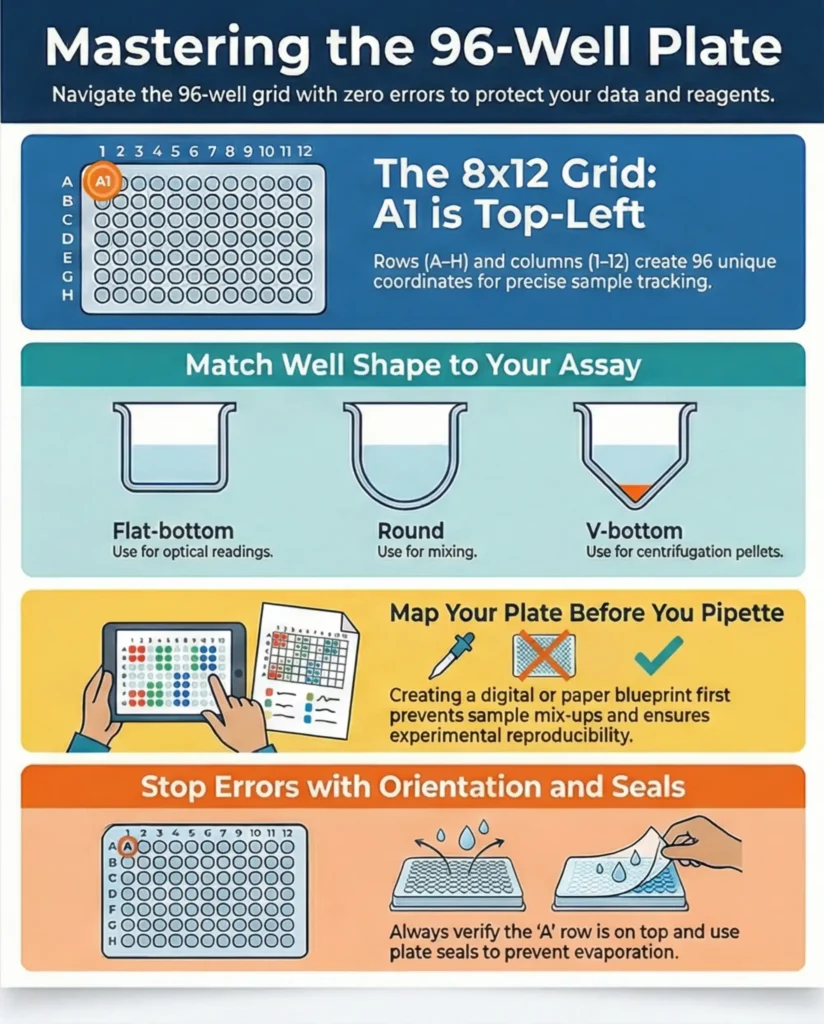
A 96-well plate is a plastic microplate with 8 rows (A–H) and 12 columns (1–12), giving you a total of 96 wells arranged in a standard grid. These plates follow ANSI/SLAS standards so they fit plate readers, automated pipettes, and lab instruments used across the US. The footprint is consistent across brands, which helps labs swap plates without worrying about size changes. Each well is shaped to hold liquid samples, cells, or reagents, and the arrangement is used for everything from ELISA and colorimetric assays to bacterial growth and high-throughput testing. The reason this format remains popular is simple: it’s efficient, reduces reagent use, and allows large numbers of tests in a compact space.
Understanding Rows, Columns, and Well Coordinates
The coordinate system is the part most beginners get wrong, especially when rushing or when a plate is rotated on the bench. Rows are labeled A through H, moving horizontally. Columns are labeled 1 through 12, moving vertically. Combine them, and you get coordinates like A1, D8, or H12. The coordinate A1 is always the top-left corner when the row letters are on the left. Misreading orientation can lead to loading the wrong wells, so it’s good practice to double-check the row letters before pipetting.
| Row | Column Range | Example Wells |
| A | 1–12 | A1, A5, A12 |
| D | 1–12 | D3, D9, D12 |
| H | 1–12 | H1, H7, H12 |
Many labs also fill plates by row or by column, depending on workflow.
- Row-wise filling works well for replicates or dilution series.
- Column-wise filling is familiar with multichannel pipettes.
Getting comfortable with both patterns can help prevent errors during extensive experiments.
Typical 96-Well Plate Types and Well Designs
Even though the grid format remains the same, 96-well plates have design differences that influence how they’re used. The three common well bottom shapes are flat-bottom, round-bottom, and V/U-bottom.
- Flat-bottom wells are used for optical readings, such as ELISA or absorbance assays.
- Round-bottom wells facilitate mixing and resuspension because the liquid collects in the center.
- V-bottom wells are helpful when you want pellets to form clearly at the base during centrifugation.
There are also half-area plates, which use smaller wells so experiments require less reagent. Deep-well plates allow higher volumes for mixing or bacterial cultures. Color variations matter too; clear plates allow optical readings, black plates reduce background in fluorescence assays, and white plates improve luminescence signals. These design choices matter because the right plate helps you achieve accurate, consistent results without troubleshooting issues that arise from using the wrong type.
Typical Applications of 96-Well Plates and Why Accurate Reading Matters
96-well plates are used across almost every life science workflow in the US, from academic labs to biotech companies and diagnostic centers. Because each experiment may involve dozens of samples, controls, and replicates, reading the plate layout correctly protects your entire workflow from preventable mistakes. Here are some of the most frequent uses:
- ELISA assays: Most ELISA kits are designed around this layout, with blanks, standards, and samples arranged in rows.
- PCR and qPCR: Thermal plates follow the same 96-well pattern, especially in clinical testing and genetics workflows.
- Cell culture and viability assays: Researchers seed cells into each well to test responses to drugs, nutrients, or environmental conditions.
- Bacterial culture plates: Microbiology uses these plates for growth curves, antibiotic testing, and metabolic studies.
- High-throughput screening: Robotics and automation platforms rely heavily on standardized 96-well dimensions.
In all these cases, the location of each sample must be recorded correctly. Even one mislabelled well throws off the entire plate, and any errors might not show up until data analysis, long after reagents and time have been spent.
How to Create and Use a Plate Map (Clear, Practical Steps)
A plate map is a diagram that shows the exact arrangement of samples, controls, and replicates inside the 96-well grid. A good map prevents confusion when loading samples and keeps your experiment reproducible across future runs and among team members. A typical plate map includes sample names, treatment groups, control wells, blank wells, and dilution layouts.
Steps to Build an Effective Plate Map
- Start with a blank 8×12 grid matching the 96-well format.
- Assign wells for controls first — negative, positive, standards, or blanks.
- Add sample wells, making sure each label is clear and unique.
- Include replicates in either adjacent wells or separate rows depending on your design.
- Document dilution series (e.g., 1:2, 1:4, 1:8) clearly in the map.
- Save a digital copy so your map stays accessible for analysis and record-keeping.
Example of How a Simple Plate Map Might Look
| Well Type | Example Locations | Notes |
| Blanks | A1, A2 | Used for baseline readings |
| Standards | B1–B6 | Typical for ELISA curves |
| Samples | C1–H12 | Loaded by row or by column |
| Replicates | Paired wells (e.g., D4/D5) | Helps verify precision |
Digital plate maps are becoming more common since they pair easily with plate reader data. This is especially helpful when exporting absorbance or fluorescence results, as the map can be merged with the numerical output for smoother analysis.
Data Management and Post-Experiment Workflow
Once your plate has been run and the plate reader has produced numerical results, the next challenge is to link each well’s value to the correct sample ID. Good data management protects the entire experiment from mix-ups. Most labs keep two sets of information for every experiment:
- Raw plate readings (absorbance, fluorescence, luminescence, Ct values)
- An annotated plate map that explains which well belongs to which sample
To analyze results correctly, you match each coordinate (such as D7 or H11) with the label on your map. Merging this information produces a clean dataset that can be used in spreadsheets, statistical software, or automated pipelines.
A common mistake occurs when coordinate labels from the reader do not match the orientation used during loading. This causes data to be assigned to the wrong sample. Checking the map before data export helps prevent this issue.
If your lab uses automation, such as robotic pipetting systems or high-throughput platforms, accurate coordinates are even more critical. Automation depends entirely on standardized dimensions, and any errors in the mapping can interrupt the entire workflow.
Troubleshooting and Best Practices
Many issues with 96-well plates come from simple handling mistakes rather than the assay itself. The good news is that most can be prevented with a few consistent habits.
Common Problems
- Loading samples into the wrong well because the plate was rotated
- Using the incorrect plate bottom shape for the assay
- Evaporation on outer wells (especially in incubators or long assays)
- Inconsistent pipetting volumes
- Poor sealing, leading to contamination or evaporation
- Cross-contamination when using multichannel pipettes
Tips to Improve Accuracy and Avoid Errors
- Always check that the A-row is on the top side before starting.
- Hold the plate in the same orientation every time, especially during pipetting and reading.
- Use fresh plate seals to prevent evaporation.
- Avoid outer wells for sensitive assays when possible. Many labs fill them with buffer to stabilize the temperature.
- Use multichannel pipettes whenever possible for even distribution across rows or columns.
- Record your plate map before pipetting, not after; mistakes are easier to catch early.
A little awareness goes a long way. Most labs develop a consistent loading routine that helps every team member avoid errors automatically.
Glossary of Common Terms (Beginner-Friendly)
Here’s a quick reference table for readers who are new to microplates. This adds clarity and helps keep your article beginner-friendly without explaining the same ideas multiple times.
| Term | Meaning |
| Well | A single chamber in the plate that holds a liquid sample |
| Row | Horizontal label (A–H) |
| Column | Vertical label (1–12) |
| Coordinate | Combination of row + column (e.g., B3) |
| Plate Map | Diagram showing the arrangement of samples and controls |
| Flat-Bottom Well | Used for optical reading and ELISA |
| Round-Bottom Well | Helps concentrate liquid in the center |
| V-Bottom Well | Helps pelleting during centrifugation |
| High-Throughput Screening | Testing many conditions quickly using microplates |
| Plate Reader | An instrument that measures absorbance, fluorescence, luminescence, or other outputs |
A glossary helps new lab workers become comfortable reading scientific protocols and reduces mistakes caused by unclear definitions.
How to Create & Use a Plate Map: Practical Guide
Creating and using a plate map is essential for organizing and tracking samples in a 96-well plate. A plate map is a visual representation that helps you assign each sample or reagent to a specific well in the plate. It is imperative when working with complex experiments, such as ELISA assays, PCR testing, or cell cultures, where precision and reproducibility are critical. Let’s break down how to create a plate map and use it effectively in your experiments.
What is a Plate Map?
A plate map is a diagram or chart that outlines the layout of the 96-well plate, specifying which sample or reagent occupies each well. In essence, it is your experiment’s blueprint, ensuring you keep track of each well’s contents. Plate maps can be created on paper, in digital spreadsheets such as Excel, or through specialized software. They help avoid mistakes such as mixing up samples, mislabeling wells, or missing wells altogether.
The layout of a 96-well plate consists of 8 rows (labeled A to H) and 12 columns (labeled 1 to 12), creating 96 wells. For example, the first well in the top-left corner is A1, while the last well in the bottom-right corner is H12. Correctly mapping your plate ensures that each sample is placed in the correct well, which is vital for accurate results.
Step-by-Step Instructions to Build a Plate Map
Start with a Blank Template
You can create a blank template of a 96-well plate in various formats (Excel, Google Sheets, or specialized software). A simple 8×12 grid works perfectly, with rows labeled A-H and columns labeled 1-12.
Plan Your Experiment
Before filling out the map, decide on the samples, controls, and reagents you need for the experiment. Think about how many replicates you need, whether you’ll use any wells as blanks, and which wells will contain positive or negative controls.
Fill in the Plate Map
Start entering the sample names, control groups, or reagents into the grid. For example:
- A1: Sample 1
- B1: Sample 2
- C1: Control 1 (positive)
- D1: Reagent A
You can color-code or use different symbols to indicate various types of samples or experimental groups. If you’re running an ELISA, for example, you might use different colors to represent different concentrations or types of antibodies.
Label Your Plate Map
Clearly label each row and column in the map to avoid confusion. You can also include essential details such as the experiment name, date, and any additional notes on the side.
Double-Check the Map
Accuracy is crucial when creating a plate map. Double-check the layout before starting the experiment to ensure no errors in labeling or sample allocation. Ensure that each well has the correct sample or reagent according to the plan.
Use Digital Tools for Better Organization
There are digital tools and software that can help you automate the process of generating plate maps. These tools allow you to fill the wells and track changes more efficiently quickly. They are invaluable when running high-throughput experiments with many variables and replicates.
Troubleshooting & Best Practices (Common Mistakes + Pro Tips)
While working with a 96-well plate, several common mistakes can throw off the accuracy of your experiment. Here are some troubleshooting tips and best practices to help you avoid these issues.
Common Mistakes in 96-Well Plate Experiments
Mislabeling Rows and Columns
It’s easy to confuse rows with columns, especially if the plate is rotated or handled frequently. Ensure you have a solid reference to guide you, and if possible, use a digital plate map or barcode system to avoid confusion.
Skipping Wells or Adding Samples to the Wrong Wells
Sometimes, in a rush, you skip a well or add the wrong sample to a well. Double-check your plate map as you proceed, and if you notice a mistake, document it immediately to avoid incorrect data analysis.
Evaporation
Evaporation is particularly problematic when using plates for extended periods. Edge wells are more prone to evaporation. To minimize evaporation:
- Use plate sealing options like adhesive covers or sealing films.
- Consider running experiments in a humidified environment.
Incorrect Pipetting Technique
Accurate pipetting is essential for filling each well with the correct amount of sample. Avoid inconsistencies by regularly calibrating your pipettes and using the correct pipette tip for each volume.
Contaminating Wells
Cross-contamination between wells can occur if pipettes or other equipment are not adequately cleaned between uses. Always use fresh tips for each sample or reagent to prevent cross-contamination of wells.
Best Practices for 96-Well Plate Experiments
To ensure accurate results, always use high-quality plates suited for your experiment, such as flat-bottom, U-bottom, or deep-well plates. Low-quality plates can affect optical clarity and cause issues in your assays. Consistent handling is crucial; always handle plates by the edges to prevent contamination and avoid leaving fingerprints or residues on the wells, which can interfere with readings.
For experiments involving large numbers of plates or replicates, consider automation. Automated systems for pipetting, plate handling, and data reading reduce human error, improve consistency, and ensure reliable, reproducible results. By following these troubleshooting tips and best practices, you can avoid many of the common pitfalls associated with working with 96-well plates and ensure that your experiments are both accurate and reproducible.